Using your Cricut Easy Press can be a useful option for your crafting projects, but getting the settings right can be tricky. That’s where the Cricut Easy Press Settings Chart Printable comes in handy. This chart provides a quick reference for temperature and time settings, ensuring your projects turn out perfectly every time. Let’s explore how to effectively use this resource to enhance your crafting experience.
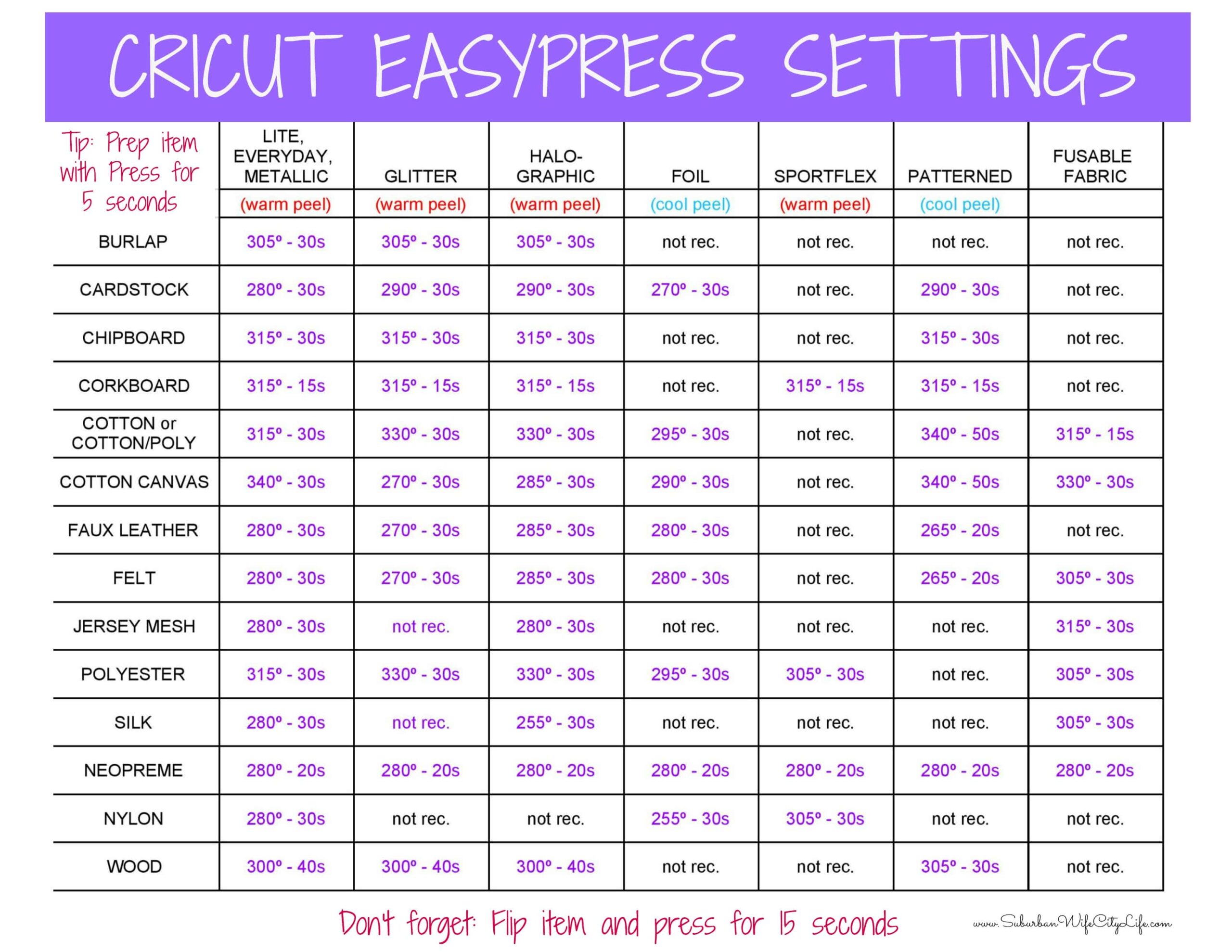
Understanding the Cricut Easy Press Settings Chart
The Cricut Easy Press Settings Chart Printable is designed to help you easily determine the appropriate heat settings for various materials. This chart lists different fabric types, along with the recommended temperature and pressing time needed for successful heat transfer. It simplifies the process, allowing you to focus on creativity rather than guesswork.
To read the chart, you’ll typically find a column for the material type, another for the recommended temperature (in Fahrenheit or Celsius), and a final column indicating the time required for pressing. Knowing how to interpret this information can save you from material damage and help you achieve professional-looking results.
Who Can Benefit From This Printable Resource?
This resource is especially useful for:
- Crafters and DIY enthusiasts: If you are making custom t-shirts, tote bags, or home decor, knowing the right settings is crucial.
- Teachers and educators: If you’re running classroom projects that involve fabric, this chart can help maintain consistency and quality.
- Small business owners: For those selling heat-pressed items, using the correct settings can improve product quality and customer satisfaction.
By having the Cricut Easy Press Settings Chart Printable on hand, you can streamline your crafting process, making it easier to achieve your desired results with every project.
How to Use the Chart Effectively
You have two main options for utilizing the Cricut Easy Press Settings Chart: digital or print.
Digital Use
If you prefer a digital approach, you can fill in a fillable PDF version of the chart on your computer. This allows you to customize the chart with your notes or specific settings that work best for your projects. You can save it to your device for easy access or even keep it open on your tablet while you work.
Printed Version
Printing the chart is a great option if you like to have a physical copy in your crafting workspace. Here are some tips for optimal results:
- Paper Choice: Use high-quality cardstock or heavy paper to ensure durability, especially if you plan to reference it frequently.
- Size Matters: Portrait layout is often best for standard printers, which makes it easy to hang on a wall or keep in a binder.
- Visibility: Consider enlarging the chart for better visibility from a distance, especially if you’re working on larger projects.
Having a printed chart can be a quick reference point as you work, reducing time spent searching for settings online.
Common Mistakes to Avoid
Even with a handy chart, mistakes can happen. Here are a few common pitfalls to watch out for:
- Ignoring Material Types: Always double-check the material type you’re working with. Different fabrics require different settings, and using the wrong one can lead to poor adhesion or damage.
- Temperature Settings: Make sure your Easy Press is calibrated correctly. A setting that’s too high can scorch your fabric, while one that’s too low may not adhere properly.
- Pressing Time: Don’t rush through the pressing time. Each material has its recommended duration for a reason, and skipping this step can lead to subpar results.
By being mindful of these common errors, you’ll ensure that your projects turn out just as you imagined.
Adapting the Chart for Your Needs
Once you become comfortable with the standard settings provided in the Cricut Easy Press Settings Chart Printable, feel free to adapt it for your specific projects. For example:
- Experimentation: If you find that a particular fabric responds better to slightly different settings, jot those down directly on your chart.
- Project-Specific Notes: You can add notes about specific projects, such as successful combinations of materials and settings.
- Create a Reference Guide: Compile your personalized notes into a separate document or section in your crafting area for quick reference in the future.
This adaptability can make your crafting process even more efficient and tailored to your unique style.