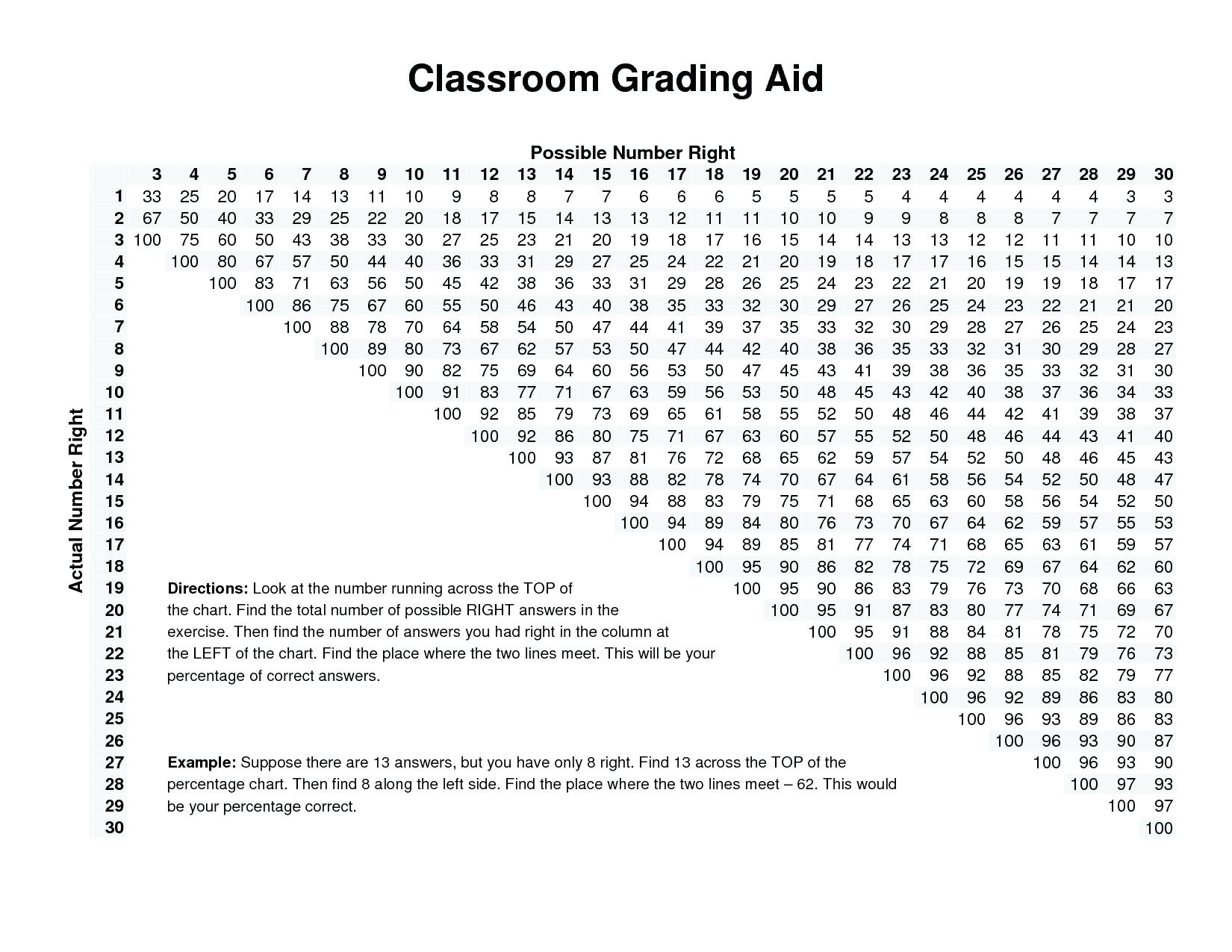
When it comes to keeping track of student grades, the Free Ez Grader Printable Chart is an incredibly handy tool. This chart can help you convert numerical scores into letter grades quickly, which is essential for parents and teachers alike. With a simple layout that is easy to read and fill in, it takes the guesswork out of grading, making it a must-have resource for anyone involved in education.
Understanding the Layout of the Ez Grader Chart
The Free Ez Grader Printable Chart is designed to maximize usability, featuring a straightforward layout that consists of various columns and rows. Typically, you’ll find the score range on one side, followed by the corresponding letter grades. This layout allows you to quickly see how a score translates into a letter grade without having to do any complex calculations.
The vertical columns usually represent percentage ranges from 0% to 100%, while the horizontal rows show the letter grades, typically ranging from A to F. This visual format makes it easy to track how well a student is performing at a glance. If you’re a parent looking to support your child’s education, this chart can be a lifesaver, especially during report card season.
How to Fill In the Chart
Filling in the Free Ez Grader Printable Chart is straightforward but requires some preparation. Before you start, gather the scores you need to convert. It’s helpful to have a list of the raw scores from tests, quizzes, or assignments that you want to evaluate.
- Identify the Scores: First, list all the scores you want to convert.
- Locate the Corresponding Range: Refer to the chart and find the corresponding percentage range for each score.
- Record the Letter Grade: Write down the letter grade next to each score for easy reference.
For instance, if your child scored an 85 on a test, you would find the 85% range on the chart, which typically corresponds to a B. This simple process helps you understand your child’s performance and areas where they may need extra help.
Where to Use the Ez Grader Chart
The Free Ez Grader Printable Chart can be used in various settings, making it a versatile tool. Here are a few ways you can integrate it into your routine:
- At Home: Use the chart to track your child’s progress throughout the school year. This can help in identifying trends, such as improvement or declines in specific subjects.
- In the Classroom: Teachers can use this chart to quickly assess student performance and determine if any adjustments need to be made to the curriculum or teaching methods.
- During Parent-Teacher Conferences: Bring along the chart to discuss specific grades with teachers, making it easier to understand how your child is doing academically.
By having this chart on hand, you’ll find that keeping track of grades becomes less stressful.
Tips for Maintaining Accurate Records
To make the most of your Free Ez Grader Printable Chart, consider these tips for maintaining accurate records:
- Regular Updates: Make a habit of updating the chart regularly with new scores. This will help you stay informed about your child’s academic performance.
- Cross-Reference with Other Tools: If you’re using other grading tools or apps, cross-reference the scores to ensure accuracy.
- Discuss with Your Child: Involve your child in the process. Discussing grades openly can foster a supportive environment where they feel encouraged to improve.
Keeping the chart updated not only helps you stay organized but also helps your child understand their academic standing.
Downloading and Printing the Chart
Getting the Free Ez Grader Printable Chart is simple. You can usually find it on various educational resource websites. Here are a few tips for printing:
- Choose the Right Paper Size: Most charts are formatted for standard letter size (8.5” x 11”). Ensure your printer settings reflect this.
- Use Quality Paper: If you plan to use the chart frequently, consider printing it on cardstock for durability.
- Consider Lamination: If you want a reusable option, laminate the printed chart. This way, you can use dry-erase markers to fill in scores and easily wipe them off for future use.
Having a printed version of the chart can make tracking grades more efficient and enjoyable.
Making the Most of Your Ez Grader Chart
The Free Ez Grader Printable Chart is more than just a grading tool; it’s an essential part of the educational journey for both parents and students. Here are a couple of ways to maximize its usefulness:
- Set Goals: Use the chart to set academic goals with your child. For example, if they consistently score in the B range, you might set a goal to achieve an A in a specific subject by the end of the semester.
- Visual Representation: Consider creating a visual representation of grades over time. You could use colored markers to highlight improvements or areas that need attention, making it easier to see trends at a glance.
Utilizing the chart in these ways can create a more engaging and supportive learning environment.
The Free Ez Grader Printable Chart is an invaluable resource that offers clarity and simplicity in tracking academic performance. By understanding its layout, filling it in accurately, and using it effectively, you’ll empower your child to take charge of their education. Whether you choose to print it out for immediate use or keep a digital copy for future reference, this chart will serve as a reliable companion in your educational toolkit.